Getting Started with Win32 Bindings
In order to call Win32 API from Zig, we need bindings. The most up to date bindings I have found is in this repo marlersoft/zigwin32, which are most comprehensive and automatically generated.
After you add that to your Zig project, here are some of the required imports we will be using to create our minimal window example:
const win32 = @import("win32/zigwin32/win32.zig");

const GetModuleHandleA = win32.kernel32.GetModuleHandleA;
const RegisterClassExA = win32.user32.RegisterClassExA;
const WNDCLASSEXA = win32.ui.windows_and_messaging.WNDCLASSEXA;
const CreateWindowExA = win32.user32.CreateWindowExA;
const GetLastError = win32.kernel32.GetLastError;
const ShowWindow = win32.user32.ShowWindow;

const SW_SHOW = win32.ui.windows_and_messaging.SW_SHOW;

const HWND = win32.foundation.HWND;
const WPARAM = usize;
const LPARAM = isize;
const LRESULT = isize;

const LoadCursorA = win32.user32.LoadCursorA;

const WS_OVERLAPPEDWINDOW = win32.ui.windows_and_messaging.WS_OVERLAPPEDWINDOW;
const CW_USEDEFAULT = win32.ui.windows_and_messaging.CW_USEDEFAULT;

const WM_DESTROY = win32.ui.windows_and_messaging.WM_DESTROY;
const PostQuitMessage = win32.user32.PostQuitMessage;
const DefWindowProcA = win32.user32.DefWindowProcA;
And here is the most minimal code that spawns a window and immediately closes it:
pub fn main(init: std.process.Init) !void {
    const arena: std.mem.Allocator = init.arena.allocator();

    const args = try init.minimal.args.toSlice(arena);
    for (args) |arg| {
        std.log.info("arg: {s}", .{arg});
    }

    const io = init.io;

    var stdout_buffer: [1024]u8 = undefined;
    var stdout_file_writer: Io.File.Writer = .init(.stdout(), io, &stdout_buffer);
    const stdout_writer = &stdout_file_writer.interface;

    try stdout_writer.flush();

    const hInstance = GetModuleHandleA(null);
    const class_name = "MyWindowClass";

    const wc = WNDCLASSEXA{
        .cbSize = @sizeOf(WNDCLASSEXA),
        .style = .{},
        .lpfnWndProc = processWindowMessage,
        .cbClsExtra = 0,
        .cbWndExtra = 0,
        .hInstance = @ptrCast(hInstance),
        .hIcon = null,
        .hCursor = LoadCursorA(null, @ptrFromInt(32512)),
        .hbrBackground = null,
        .lpszMenuName = null,
        .lpszClassName = class_name,
        .hIconSm = null,
    };

    _ = RegisterClassExA(&wc);

    const hwnd = CreateWindowExA(
        .{},
        class_name,
        "Zig Window",
        WS_OVERLAPPEDWINDOW,
        CW_USEDEFAULT,
        CW_USEDEFAULT,
        640,
        480,
        null,
        null,
        @ptrCast(hInstance),
        null,
    );

    if (hwnd) |hwndV| {
        _ = ShowWindow(hwndV, SW_SHOW);
    } else {
        const err = GetLastError();
        std.debug.print("CreateWindowExA failed, GetLastError, {}\n", .{err});
        return error.CreateWindowFailed;
    }
}

fn processWindowMessage(hwnd: HWND, msg: u32, wParam: WPARAM, lParam: LPARAM) callconv(.winapi) LRESULT {
    switch (msg) {
        WM_DESTROY => {
            PostQuitMessage(0);
            return 0;
        },
        else => return DefWindowProcA(hwnd, msg, wParam, lParam),
    }
}
The window immediately closes because our main function exits. We need to run a game loop so the program never exits, until the user explicitly closes the program.
The Game Loop
Here’s the minimal game loop with required bindings:
const MSG = win32.ui.windows_and_messaging.MSG;
const PeekMessageA = win32.user32.PeekMessageA;
const PM_REMOVE = win32.ui.windows_and_messaging.PM_REMOVE;

const WM_QUIT = win32.ui.windows_and_messaging.WM_QUIT;
const TranslateMessage = win32.user32.TranslateMessage;
const DispatchMessageA = win32.user32.DispatchMessageA;

fn runGameLoop() !void {
    var msg: MSG = undefined;

    var running = true;

    while (running) {
        while (PeekMessageA(&msg, null, 0, 0, PM_REMOVE) != 0) {
            if (msg.message == WM_QUIT) {
                running = false;
                break;
            }

            _ = TranslateMessage(&msg);
            _ = DispatchMessageA(&msg);
        }

        if (!running) break;

        // update();
        // render();
    }
}
Call this at the end of the main function. So we Show the Window, and enter into this loop.
try runGameLoop();
processWindowMessage is always called by windows, for handling user events like input or other window messages, but we have to listen to those messages with PeekMessageA and explicitly dispatch them to windows with DispatchMessage so windows calls this method for us with the user messages. This is why our game loop calls PeekMessageA and DispatchMessageA to check for any messages and let the windows call our handler.
We will fill our handler to listen for keyboard events, and set our state we can use later.
The important thing at this milestone is when you add this piece of code and run it, the window will stay open until you close it.
Initialize Direct3D 11 and Clear the Screen to Blue
I am not going to discuss what we need in order to setup a Direct3D 11 rendering backend. I will outright show you the relevant code so you can initialize everything as we want it:
const DXGI_SWAP_CHAIN_DESC = win32.graphics.dxgi.DXGI_SWAP_CHAIN_DESC;
const IDXGISwapChain = win32.graphics.dxgi.IDXGISwapChain;
const ID3D11Device = win32.graphics.direct3d11.ID3D11Device;
const ID3D11DeviceContext = win32.graphics.direct3d11.ID3D11DeviceContext;
const D3D_FEATURE_LEVEL = win32.graphics.direct3d.D3D_FEATURE_LEVEL;

const D3D11_CREATE_DEVICE_FLAG = win32.graphics.direct3d11.D3D11_CREATE_DEVICE_FLAG;
const D3D11_CREATE_DEVICE_DEBUG = win32.graphics.direct3d11.D3D11_CREATE_DEVICE_DEBUG;

const D3D11CreateDeviceAndSwapChain = win32.d3d11.D3D11CreateDeviceAndSwapChain;
const D3D_DRIVER_TYPE_HARDWARE = win32.graphics.direct3d.D3D_DRIVER_TYPE_HARDWARE;
const D3D11_SDK_VERSION = win32.graphics.direct3d11.D3D11_SDK_VERSION;

const ID3D11Texture2D = win32.graphics.direct3d11.ID3D11Texture2D;
const IID_ID3D11Texture2D = win32.graphics.direct3d11.IID_ID3D11Texture2D;

const ID3D11RenderTargetView = win32.graphics.direct3d11.ID3D11RenderTargetView;

const D3D11_VIEWPORT = win32.graphics.direct3d11.D3D11_VIEWPORT;

const DXGI_FORMAT_R8G8B8A8_UNORM = win32.graphics.dxgi.common.DXGI_FORMAT_R8G8B8A8_UNORM;
const DXGI_SWAP_EFFECT_DISCARD = win32.graphics.dxgi.DXGI_SWAP_EFFECT_DISCARD;

const TRUE = win32.foundation.TRUE;

const HRESULT = win32.zig.HRESULT;

const DXGI_USAGE_RENDER_TARGET_OUTPUT = win32.graphics.dxgi.DXGI_USAGE_RENDER_TARGET_OUTPUT;

const MyDirectXContext = struct {
    back_buffer: *ID3D11Texture2D,
    rtv: *ID3D11RenderTargetView,
    device: *ID3D11Device,
    context: *ID3D11DeviceContext,
    swap_chain: *IDXGISwapChain,

    const Self = @This();
    fn deinit(self: *Self) void {
        _ = self.back_buffer.IUnknown.Release();
        _ = self.rtv.IUnknown.Release();

        _ = self.context.IUnknown.Release();
        _ = self.device.IUnknown.Release();
        _ = self.swap_chain.IUnknown.Release();
    }

    fn init(hwnd: HWND) !MyDirectXContext {
        const swap_chain_desc = DXGI_SWAP_CHAIN_DESC{
            .BufferDesc = .{
                .Width = 1280,
                .Height = 720,
                .Format = DXGI_FORMAT_R8G8B8A8_UNORM,
                .RefreshRate = .{ .Numerator = 60, .Denominator = 1 },
                .ScanlineOrdering = .UNSPECIFIED,
                .Scaling = .UNSPECIFIED,
            },
            .SampleDesc = .{ .Count = 1, .Quality = 0 },
            .BufferUsage = DXGI_USAGE_RENDER_TARGET_OUTPUT,
            .BufferCount = 1,
            .OutputWindow = hwnd,
            .Windowed = TRUE,
            .SwapEffect = DXGI_SWAP_EFFECT_DISCARD,
            .Flags = 0,
        };

        var swap_chain: *IDXGISwapChain = undefined;
        var device: *ID3D11Device = undefined;
        var context: *ID3D11DeviceContext = undefined;
        var feature_level: D3D_FEATURE_LEVEL = undefined;

        const create_flags: D3D11_CREATE_DEVICE_FLAG = if (@import("builtin").mode == .Debug)
            D3D11_CREATE_DEVICE_DEBUG
        else
            .{};

        var hr = D3D11CreateDeviceAndSwapChain(
            null, // default adapater
            D3D_DRIVER_TYPE_HARDWARE,
            null,
            create_flags,
            null, // let it pick the highest feature level available
            0,
            D3D11_SDK_VERSION,
            &swap_chain_desc,
            @ptrCast(&swap_chain),
            @ptrCast(&device),
            &feature_level,
            @ptrCast(&context),
        );

        if (hr != HRESULT.S_OK) return error.D3D11DeviceCreationFailed;

        var back_buffer: *ID3D11Texture2D = undefined;
        hr = swap_chain.GetBuffer(0, IID_ID3D11Texture2D, @ptrCast(&back_buffer));
        if (hr != HRESULT.S_OK) return error.GetBackBufferFailed;
        errdefer _ = back_buffer.IUnknown.Release();

        var rtv: *ID3D11RenderTargetView = undefined;
        hr = device.CreateRenderTargetView(@ptrCast(back_buffer), null, @ptrCast(&rtv));
        if (hr != HRESULT.S_OK) return error.CreateRTVFailed;
        errdefer _ = rtv.IUnknown.Release();

        context.OMSetRenderTargets(1, @ptrCast(&rtv), null);

        var viewport = D3D11_VIEWPORT{
            .Width = 1280.0,
            .Height = 720.0,
            .MinDepth = 0.0,
            .MaxDepth = 1.0,
            .TopLeftX = 0.0,
            .TopLeftY = 0.0,
        };
        context.RSSetViewports(1, @ptrCast(&viewport));

        return .{
            .back_buffer = back_buffer,
            .rtv = rtv,
            .context = context,
            .device = device,
            .swap_chain = swap_chain,
        };
    }
};
This will initialize the Direct3D 11 Context. Here’s how we will use it:
    if (hwnd) |hwndV| {
        _ = ShowWindow(hwndV, SW_SHOW);

        var context: MyDirectXContext = try .init(hwndV);
        defer context.deinit();

        try runGameLoop(context);
    } else {
        const err = GetLastError();
        std.debug.print("CreateWindowExA failed, GetLastError, {}\n", .{err});
        return error.CreateWindowFailed;
    }
So runGameLoop takes in the context, and in the update loop we clear the screen:
    fn runGameLoop(cx: MyDirectXContext) !void {

        // ...

        while (running) {

        // ...

        if (!running) break;

        var clear_color = [4]f32{ 0.10, 0.10, 0.35, 1.0 }; // dark blue
        // ClearRenderTargetView expects an optional pointer to f32 (RGBA),
        // so pass a pointer to the first element and cast to the expected type.
        cx.context.ClearRenderTargetView(cx.rtv, @ptrCast(&clear_color[0]));

        _ = cx.swap_chain.Present(1, 0); // 1 = vynsc on

        // update();
        // render();
    } // end of loop
At the end of this setup, and update, we will see our window clear to dark blue as expected.
Compile Shaders and Render the First Triangle
Next step is to render the first triangle. But we need hlsl shaders and compile them using a tool that comes with Windows SDK called fxc.exe. Once you have that program, we will setup a build step to compile our hlsl shader so we can embed the shader bytecode directly into our program and not have to compile any shaders at runtime.
Here is the build.zig that sets up this compilation build step.
    const shader_dir = "src/shaders";

    const compile_vs = b.addSystemCommand(&.{
        "bin/fxc.exe",                  "/nologo",
        "/T",                           "vs_5_0",
        "/E",                           "VSMain",
        "/Fo",                          shader_dir ++ "/triangle_vs.cso",
        shader_dir ++ "/triangle.hlsl",
    });

    const compile_ps = b.addSystemCommand(&.{
        "bin/fxc.exe",                  "/nologo",
        "/T",                           "ps_5_0",
        "/E",                           "PSMain",
        "/Fo",                          shader_dir ++ "/triangle_ps.cso",
        shader_dir ++ "/triangle.hlsl",
    });

    // this removes the console when running the application but
    // for debugging leave it on to display runtime errors.
    //exe.subsystem = .Windows;

    exe.step.dependOn(&compile_vs.step);
    exe.step.dependOn(&compile_ps.step);
add the following shader to your src/shaders directory and run the build to check if it compiles the shaders. Make sure you have fxc.exe available in bin/fxc.exe path.
// Compiled offline by fxc.exe (see build.zig) into DXBC bytecode that gets
// @embedFile'd into the exe -- nothing in main.zig calls D3DCompile.

struct VSInput
{
    float3 pos   : POSITION;
    float4 color : COLOR;
};

struct PSInput
{
    float4 pos   : SV_POSITION;
    float4 color : COLOR;
};

PSInput VSMain(VSInput input)
{
    PSInput output;
    output.pos = float4(input.pos, 1.0);
    output.color = input.color;
    return output;
}

float4 PSMain(PSInput input) : SV_TARGET
{
    return input.color;
}
Now we have a bunch of new bindings to import, and the shaders are embedded at compile time like this:
const vs_bytecode = @embedFile("shaders/triangle_vs.cso");
const ps_bytecode = @embedFile("shaders/triangle_ps.cso");

const ID3D11VertexShader = win32.graphics.direct3d11.ID3D11VertexShader;
const ID3D11PixelShader = win32.graphics.direct3d11.ID3D11PixelShader;
const D3D11_INPUT_ELEMENT_DESC = win32.graphics.direct3d11.D3D11_INPUT_ELEMENT_DESC;
const ID3D11InputLayout = win32.graphics.direct3d11.ID3D11InputLayout;
const D3D11_BUFFER_DESC = win32.graphics.direct3d11.D3D11_BUFFER_DESC;
const D3D11_SUBRESOURCE_DATA = win32.graphics.direct3d11.D3D11_SUBRESOURCE_DATA;
const ID3D11Buffer = win32.graphics.direct3d11.ID3D11Buffer;
const D3D11_PRIMITIVE_TOPOLOGY_TRIANGLELIST = win32.graphics.direct3d.D3D11_PRIMITIVE_TOPOLOGY_TRIANGLELIST;

const D3D11_USAGE_IMMUTABLE = win32.graphics.direct3d11.D3D11_USAGE_IMMUTABLE;
const D3D11_BIND_VERTEX_BUFFER = win32.graphics.direct3d11.D3D11_BIND_VERTEX_BUFFER;

const DXGI_FORMAT_R32G32B32_FLOAT = win32.graphics.dxgi.common.DXGI_FORMAT_R32G32B32_FLOAT;
const D3D11_INPUT_PER_VERTEX_DATA = win32.graphics.direct3d11.D3D11_INPUT_PER_VERTEX_DATA;
The following new code goes inside your init method:
const MyDirectXContext = struct {

    // rest of fields

    input_layout: *ID3D11InputLayout,
    vertex_buffer: ID3D11Buffer,

    fn deinit(self: *Self) void {
        // rest
        _ = self.input_layout.IUnknown.Release();
        _ = self.vertex_buffer.IUnknown.Release();
    }

    fn init(hwnd: HWND) !MyDirectXContext {

        // rest of the code

        // Shader additions

        var vertex_shader: *ID3D11VertexShader = undefined;
        hr = device.CreateVertexShader(vs_bytecode, vs_bytecode.len, null, @ptrCast(&vertex_shader));
        if (hr != HRESULT.S_OK) return error.CreateVertexShaderFailed;
        defer _ = vertex_shader.IUnknown.Release();

        var pixel_shader: *ID3D11PixelShader = undefined;
        hr = device.CreatePixelShader(ps_bytecode, ps_bytecode.len, null, @ptrCast(&pixel_shader));
        if (hr != HRESULT.S_OK) return error.CreatePixelShaderFailed;
        defer _ = pixel_shader.IUnknown.Release();

        const input_element_descs = [_]D3D11_INPUT_ELEMENT_DESC{
            .{
                .SemanticName = "POSITION",
                .SemanticIndex = 0,
                .Format = DXGI_FORMAT_R32G32B32_FLOAT,
                .InputSlot = 0,
                .AlignedByteOffset = 0,
                .InputSlotClass = D3D11_INPUT_PER_VERTEX_DATA,
                .InstanceDataStepRate = 0,
            },
            .{
                .SemanticName = "COLOR",
                .SemanticIndex = 0,
                .Format = DXGI_FORMAT_R32G32B32_FLOAT,
                .InputSlot = 0,
                .AlignedByteOffset = 12, // 3 floats of POSITION
                .InputSlotClass = D3D11_INPUT_PER_VERTEX_DATA,
                .InstanceDataStepRate = 0,
            },
        };

        var input_layout: *ID3D11InputLayout = undefined;
        hr = device.CreateInputLayout(
            &input_element_descs,
            input_element_descs.len,
            vs_bytecode,
            vs_bytecode.len,
            @ptrCast(&input_layout),
        );
        if (hr != HRESULT.S_OK) return error.CreateInputLayoutFailed;
        errdefer _ = input_layout.IUnknown.Release();

        // --- Vertex buffer: one small hardcoded triangle, in NDC space already
        // (no view/projection matrix yet)
        const Vertex = extern struct {
            pos: [3]f32,
            color: [4]f32,
        };

        const vertices = [_]Vertex{
            .{ .pos = .{ 0.0, 0.5, 0.0 }, .color = .{ 1.0, 0.0, 0.0, 1.0 } },
            .{ .pos = .{ 0.0, -0.5, 0.0 }, .color = .{ 0.0, 1.0, 0.0, 1.0 } },
            .{ .pos = .{ -0.5, -0.5, 0.0 }, .color = .{ 0.0, 0.0, 1.0, 1.0 } },
        };

        var buffer_desc = D3D11_BUFFER_DESC{
            .ByteWidth = @sizeOf(@TypeOf(vertices)),
            .Usage = D3D11_USAGE_IMMUTABLE,
            .BindFlags = D3D11_BIND_VERTEX_BUFFER,
            .CPUAccessFlags = .{},
            .MiscFlags = .{},
            .StructureByteStride = 0,
        };

        var init_data = D3D11_SUBRESOURCE_DATA{
            .pSysMem = &vertices,
            .SysMemPitch = 0,
            .SysMemSlicePitch = 0,
        };

        var vertex_buffer: ID3D11Buffer = undefined;
        hr = device.CreateBuffer(&buffer_desc, &init_data, @ptrCast(&vertex_buffer));
        if (hr != HRESULT.S_OK) return error.CreateVertexBufferFailed;
        errdefer _ = vertex_buffer.IUnknown.Release();

        // Everything above is set once; only Clear/Draw/Present repeat per frame.

        context.IASetInputLayout(input_layout);
        context.IASetPrimitiveTopology(D3D11_PRIMITIVE_TOPOLOGY_TRIANGLELIST);
        const stride: u32 = @sizeOf(Vertex);
        const offset: u32 = 0;
        context.IASetVertexBuffers(0, 1, @ptrCast(&vertex_buffer), &.{stride}, &.{offset});
        context.VSSetShader(vertex_shader, null, 0);
        context.PSSetShader(pixel_shader, null, 0);

        return .{
            .vertex_buffer = vertex_buffer,
            .input_layout = input_layout,
            // rest
        };
    }


    // NEW: move previous draw operations in this method
    fn draw(self: Self) void {
        var clear_color = [4]f32{ 0.10, 0.10, 0.35, 1.0 };

        self.context.ClearRenderTargetView(self.rtv, @ptrCast(&clear_color[0]));

        self.context.Draw(3, 0); // 3 vertices

        _ = self.swap_chain.Present(1, 0); // 1 = vsync on
    }
call this draw method inside our game loop like this:
   // if (!running break);

   cx.draw();

   // update();
   // render();
Congratulations for this output: 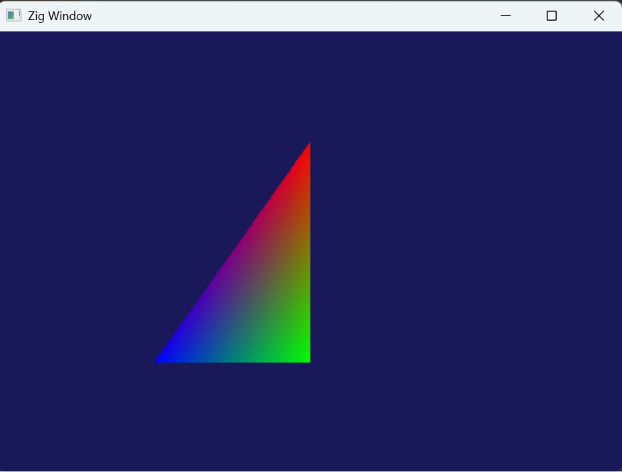
But somethings off. The triangle is not centered correctly. Let’s try to fix it.
First off change the vertices like this:
        const vertices = [_]Vertex{
            .{ .pos = .{ 1.0, 1.0, 0.0 }, .color = .{ 1.0, 0.0, 0.0, 1.0 } },
            .{ .pos = .{ 1.0, -1.0, 0.0 }, .color = .{ 0.0, 1.0, 0.0, 1.0 } },
            .{ .pos = .{ -1.0, -1.0, 0.0 }, .color = .{ 0.0, 0.0, 1.0, 1.0 } },
        };
Instead of 0.5, they are at the -1, and 1 corners, that is supposed to make the triangle cover the entire half of the screen no matter what the screen size is. Triangle will strecth.
If that doesn’t help, here are some changes you can try to resolve this issue:
    // this seems somewhat related to scaling the window
    _ = SetProcessDpiAwarenessContext(DPI_AWARENESS_CONTEXT_PER_MONITOR_AWARE_V2);
Note that I am not giving you where the corresponding bindings are located anymore, you can expect to find them yourself at this point.
More on let’s subtract the title area from the rendered client area:
const client_width: i32 = 1280;
const client_height: i32 = 720;

    // ...
    var window_rect = RECT{ .left = 0, .top = 0, .right = client_width, .bottom = client_height };
    _ = AdjustWindowRectEx(&window_rect, WS_OVERLAPPEDWINDOW, FALSE, .{});
When creating a window like this:
    const hwnd = CreateWindowExA(
        .{},
        class_name,
        "Zig Window",
        WS_OVERLAPPEDWINDOW,
        CW_USEDEFAULT,
        CW_USEDEFAULT,
        window_rect.right - window_rect.left,
        window_rect.bottom - window_rect.top,
        null,
        null,
        @ptrCast(hInstance),
        null,
    );
At this point, you shall see the triangle covering the full half side of the screen. Good job.