I’ve setup some milestones, we will work our way up to this:
- Milestone 6: Sprite renderer
- Milestone 5: Alpha blending
- Milestone 4: Nearest-neighbor sampling
- Milestone 3: Texture atlas
- Milestone 2: Create a textured quad
- Milestone 1: Load a PNG
In this post we will follow this path to display a full textured quad covering the entire game area:
PNG file
    ↓
WIC decoder
    ↓
32-bit RGBA pixel buffer
    ↓
ID3D11Texture2D
    ↓
Shader Resource View
    ↓
Pixel shader samples texture
We only care about the right setup with the SDK to display this PNG file. Let’s get started.
Windows WIC decoder using COM Interface
COM Interface has to be initialized per thread once at the start of your program:
pub fn MyComInitialize() !void {
    const hr = CoInitializeEx(null, COINIT_APARTMENTTHREADED);
    if (hr != HRESULT.S_OK) return error.FailedInitCom;
}
And here’s the necessary calls that should be made to decode a PNG file and copy the RGB data into a buffer we can pass to Direct3D11 Textures:
pub const MyWicFactory = struct {
    wic_factory: *IWICImagingFactory,

    const Self = @This();
    pub fn deinit(self: *Self) void {
        _ = self.wic_factory.IUnknown.Release();
    }

    pub fn init() !MyWicFactory {
        var wic_factory: *IWICImagingFactory = undefined;

        const hr = CoCreateInstance(
            &CLSID_WICImagingFactory,
            null,
            CLSCTX_INPROC_SERVER,
            IID_IWICImagingFactory,
            @ptrCast(&wic_factory),
        );
        if (hr != HRESULT.S_OK) return error.FailedCreateWicFactory;

        return .{ .wic_factory = wic_factory };
    }

    pub fn png(self: *MyWicFactory, lpath: [*:0]const u16, pixels: []u8) ![]u8 {
        var decoder: *IWICBitmapDecoder = undefined;

        var hr = self.wic_factory.CreateDecoderFromFilename(
            lpath,
            null,
            GENERIC_READ,
            WICDecodeMetadataCacheOnDemand,
            @ptrCast(&decoder),
        );
        if (hr != HRESULT.S_OK) return error.FailedCreateDecoder;
        defer _ = decoder.IUnknown.Release();

        var frame: *IWICBitmapFrameDecode = undefined;
        hr = decoder.GetFrame(0, @ptrCast(&frame));
        if (hr != HRESULT.S_OK) return error.FailedGetFrame;
        defer _ = frame.IUnknown.Release();

        var converter: *IWICFormatConverter = undefined;
        hr = self.wic_factory.CreateFormatConverter(@ptrCast(&converter));
        if (hr != HRESULT.S_OK) return error.FailedCreateFormatConverter;
        defer _ = converter.IUnknown.Release();

        var dstFormat = GUID_WICPixelFormat32bppRGBA;

        hr = converter.Initialize(
            &frame.IWICBitmapSource,
            &dstFormat,
            WICBitmapDitherTypeNone,
            null,
            0.0,
            WICBitmapPaletteTypeCustom,
        );
        if (hr != HRESULT.S_OK) return error.FailedConverterInitialize;

        var width: u32 = undefined;
        var height: u32 = undefined;

        hr = converter.IWICBitmapSource.GetSize(&width, &height);
        if (hr != HRESULT.S_OK) return error.FailedGetSize;

        const stride = width * 4;

        hr = converter.IWICBitmapSource.CopyPixels(
            null,
            stride,
            width * height * 4,
            @ptrCast(pixels),
        );
        if (hr != HRESULT.S_OK) return error.FailedCopyPixels;

        return pixels[0 .. width * height * 4];
    }
};
Note that png method accepts lpath: [*:0]const u16 Unicode encoded path string, here’s the helper struct to locate and do the convertion:
pub const MyAssetsPathLocator = struct {
    pub fn executableDirPath(io: std.Io, buf: []u8) ![]u8 {
        const len = try std.process.executableDirPath(io, buf);
        return buf[0..len];
    }

    pub fn assetsPath(allocator: Allocator, exe_dir: []u8) ![]u8 {
        return try std.fs.path.join(allocator, &.{ exe_dir, "assets" });
    }

    pub fn atlasPngPath(allocator: Allocator, exe_dir: []u8) ![]u8 {
        return try std.fs.path.join(allocator, &.{ exe_dir, "assets", "atlas.png" });
    }

    pub fn convertToU16WindowsPath(allocator: Allocator, path: []u8) ![:0]u16 {
        return try std.unicode.utf8ToUtf16LeAllocZ(allocator, path);
    }
};
To wire this up, here’s the example usage code to test this out:
    try png.MyComInitialize();
    var mywic_factory = try png.MyWicFactory.init();
    defer mywic_factory.deinit();

    var buf: [std.fs.max_path_bytes]u8 = undefined;
    const exePath = try MyAssetsPathLocator.executableDirPath(io, &buf);

    const atlasPngPath = try MyAssetsPathLocator.atlasPngPath(allocator, exePath);
    defer allocator.free(atlasPngPath);

    const atlasPngU16 = try MyAssetsPathLocator.convertToU16WindowsPath(allocator, atlasPngPath);
    defer allocator.free(atlasPngU16);
    //const slice: []const u16 = std.mem.span(atlasPgnU16);

    //std.debug.print("Exe: {s}\n", .{exePath});
    //std.debug.print("AtlasPgn: {s}\n", .{atlasPgnPath});
    //std.debug.print("atlasU16: {f}\n", .{std.unicode.fmtUtf16Le(slice)});

    var pngBuf: [1024 * 100 * 1]u8 = undefined;
    const a = try mywic_factory.png(atlasPngU16, &pngBuf);
    std.debug.print("\n{d}\n", .{a.len});
Few things to note here,
pngBufmust be big enough to hold the decoded RGBA data otherwise it will crash.exePathlocates the path of the executable of our program. Which is used to locate our PNG path.
Our PNG path is located at ./assets/atlas.png. But it doesn’t exist yet, we need a build step to copy the assets from source to bin folder.
Here’s the build step to copy the assets directory (located at src/assets) into bin directory where our executable is located:
    b.installDirectory(.{
        .source_dir = b.path("src/assets"),
        .install_dir = .bin,
        .install_subdir = "assets",
    });
This will be enough to get the PNG data read from a file into RGBA buffer we can use to display as image.
Drawing a Full Quad with Indices and Sampling with UV data and a Texture loaded from a PNG
Earlier we drew 1 triangle with 3 vertices where each vertex holded a color information. But we want our vertices to hold the UV information instead.
    const Vertex = extern struct {
        pos: [3]f32,
        uv: [2]f32,
    };


    const vertices = [_]Vertex{
        .{ .pos = .{ -1.0, 1.0, 0.0 }, .uv = .{ 0.0, 0.0 } }, // top-left
        .{ .pos = .{ 1.0, 1.0, 0.0 }, .uv = .{ 1.0, 0.0 } }, //top-right
        .{ .pos = .{ 1.0, -1.0, 0.0 }, .uv = .{ 1.0, 1.0 } }, //bottom-right
        .{ .pos = .{ -1.0, -1.0, 0.0 }, .uv = .{ 0.0, 1.0 } }, //bottom-left
    };

    const indices = [_]u16{ 0, 1, 2, 0, 2, 3 };
Also note the indices, as we will be drawing in indices mode. Let’s create the indices buffer:
        var index_buf_desc = D3D11_BUFFER_DESC{
            .ByteWidth = @sizeOf(@TypeOf(indices)),
            .Usage = D3D11_USAGE_DEFAULT,
            .BindFlags = D3D11_BIND_INDEX_BUFFER,
            .CPUAccessFlags = .{},
            .MiscFlags = .{},
            .StructureByteStride = 0,
        };
        var ib_init = D3D11_SUBRESOURCE_DATA{
            .pSysMem = &indices,
            .SysMemPitch = 0,
            .SysMemSlicePitch = 0,
        };

        var index_buffer: *ID3D11Buffer = undefined;
        hr = device.CreateBuffer(&index_buf_desc, &ib_init, @ptrCast(&index_buffer));
        if (hr != HRESULT.S_OK) return error.CreateIndexBufferFailed;
        errdefer _ = index_buffer.IUnknown.Release();
At draw time at Pass 1 we set some state, and use DrawIndexed call:
        self.context.IASetIndexBuffer(self.index_buffer, DXGI_FORMAT_R16_UINT, 0);

        var raw_srv2 = [_]?*ID3D11ShaderResourceView{self.atlas_srv};
        const atlas_srvs: ?[*]?*ID3D11ShaderResourceView = &raw_srv2;
        self.context.PSSetShaderResources(0, 1, atlas_srvs);

        var raw_sampler2 = [_]?*ID3D11SamplerState{self.sampler};
        const samplers2: ?[*]?*ID3D11SamplerState = &raw_sampler2;
        self.context.PSSetSamplers(0, 1, samplers2);

        self.context.DrawIndexed(6, 0, 0);
self.sampler is something we reuse from previously setup, atlas_srv is a new Shader Resource View that contains our texture.
We also have to change our Input Layout (earlier this contained COLOR, instead of TEXCOORD as it is now):
        const input_element_descs = [_]D3D11_INPUT_ELEMENT_DESC{
            .{
                .SemanticName = "POSITION",
                .SemanticIndex = 0,
                .Format = DXGI_FORMAT_R32G32B32_FLOAT,
                .InputSlot = 0,
                .AlignedByteOffset = 0,
                .InputSlotClass = D3D11_INPUT_PER_VERTEX_DATA,
                .InstanceDataStepRate = 0,
            },
            .{
                .SemanticName = "TEXCOORD",
                .SemanticIndex = 0,
                .Format = DXGI_FORMAT_R32G32_FLOAT,
                .InputSlot = 0,
                .AlignedByteOffset = 12, // 3 floats * 4 bytes = offset past pos
                .InputSlotClass = D3D11_INPUT_PER_VERTEX_DATA,
                .InstanceDataStepRate = 0,
            },
        };
Finally our shader triangle.hlsl has to be updated:
struct VSInput
{
    float3 pos   : POSITION;
    float2 uv : TEXCOORD0;
};

struct PSInput
{
    float4 pos   : SV_POSITION;
    float2 uv : TEXCOORD0;
};

PSInput VSMain(VSInput input)
{
    PSInput output;
    output.pos = float4(input.pos, 1.0);
    output.uv = input.uv;
    return output;
}

Texture2D tex0 : register(t0);
SamplerState samp0 : register(s0);

float4 PSMain(PSInput input) : SV_TARGET
{
    // use this to debug input layout without sampling the texture
    //return float4(1.0, 0.0, 0.0, 1.0);
    return tex0.Sample(samp0, input.uv);
}
Now load the texture and wire to the shader resource view:
    var atlas_tex_desc = D3D11_TEXTURE2D_DESC{
        .Width = atlas_width,
        .Height = atlas_height,
        .MipLevels = 1,
        .ArraySize = 1,
        .Format = DXGI_FORMAT_R8G8B8A8_UNORM,
        .SampleDesc = .{ .Count = 1, .Quality = 0 },
        .Usage = D3D11_USAGE_DEFAULT,
        .BindFlags = .{ .SHADER_RESOURCE = 1 },
        .CPUAccessFlags = .{},
        .MiscFlags = .{},
    };

    const atlas_init_data = D3D11_SUBRESOURCE_DATA{
        .pSysMem = pixel_buffer.ptr,
        .SysMemPitch = atlas_width * 4,
        .SysMemSlicePitch = 0,
    };

    var atlas_tex: *ID3D11Texture2D = undefined;
    hr = device.CreateTexture2D(&atlas_tex_desc, &atlas_init_data, @ptrCast(&atlas_tex));
    if (hr != HRESULT.S_OK) return error.CreateAtlasTextureFailed;
    defer _ = atlas_tex.IUnknown.Release();
    var atlas_srv: *ID3D11ShaderResourceView = undefined;
    hr = device.CreateShaderResourceView(@ptrCast(atlas_tex), null, @ptrCast(&atlas_srv));
    if (hr != HRESULT.S_OK) return error.CreateAtlasSRVFailed;
    errdefer _ = game_srv.IUnknown.Release();
This final piece is a field of our struct ``MyDirectXContext`:
atlas_srv: *ID3D11ShaderResourceView,
Recall that it is used in our draw call like this as I showed earlier:
self.context.PSSetShaderResources(0, 1, atlas_srvs);
The final wiring is the atlas_width, atlas_height, and pixel_buffer variables, all will be passed as arguments to the init method like this:
fn init(hwnd: HWND, atlas_width: u32, atlas_height: u32, pixel_buffer: []const u8) !MyDirectXContext {
And finally we call it with hardcoded values:
    // hardcode these dimensions and pngBuf comes from the first section of our setup.
    const atlas_width = 160;
    const atlas_height = 160;
    const pixel_buffer = pngBuf;

    // ...
    var context: MyDirectXContext = try .init(hwndV, atlas_width, atlas_height, &pixel_buffer);
Nearest Sampling for our Pixel Perfect Rendering
We switch our sampling Filter to .Filter = D3D11_FILTER_MIN_MAG_MIP_POINT, to get crisp pixelated view:
     var sampler_desc = D3D11_SAMPLER_DESC{
            .Filter = D3D11_FILTER_MIN_MAG_MIP_POINT,
            .AddressU = D3D11_TEXTURE_ADDRESS_CLAMP,
            .AddressV = D3D11_TEXTURE_ADDRESS_CLAMP,
            .AddressW = D3D11_TEXTURE_ADDRESS_CLAMP,
            .ComparisonFunc = D3D11_COMPARISON_NEVER,
            .MaxLOD = D3D11_FLOAT32_MAX,
            .MipLODBias = 0,
            .MaxAnisotropy = 0,
            .BorderColor = [4]f32{ 0.0, 0.0, 0.0, 1.0 },
            .MinLOD = 0,
        };
With this final change, we shall see our PNG file shown fully in Pixelated style onto the game area, scaling and fullscreen modes should work as expected.
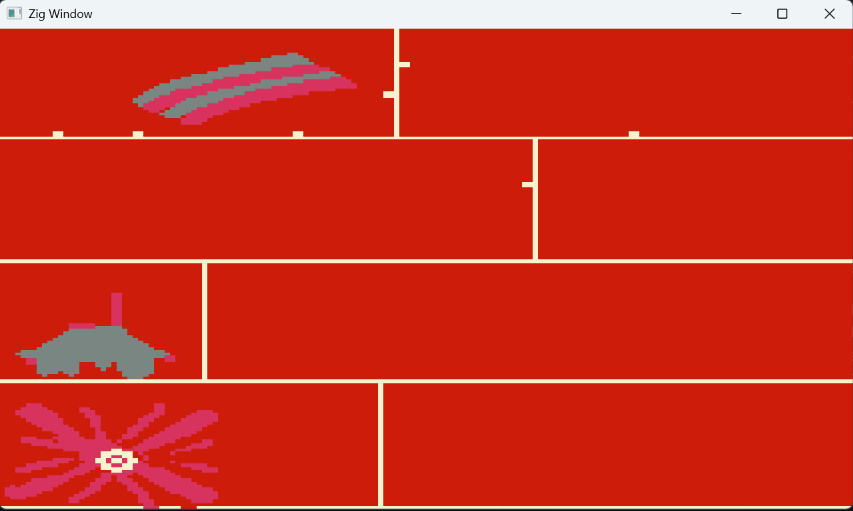
Don’t forget to create the src/assets/atlas.png file with your image data.
I’ve decided to tag commits for the source code for this posts, with the changes applied. The tag for this one is v.0.1.0.